1f4dc1038SHarlanC<p align="center" width="100%"> 2832effefSHarlanC <img width="38%" src="https://user-images.githubusercontent.com/10411078/149529602-7dcbaf26-55cd-4588-8989-206b76d32f07.png"> 3f4dc1038SHarlanC</p> 4f4dc1038SHarlanC 5d20ba44cSwawacry 6888fa685SHarlanC[](https://crates.io/crates/xiu) 7888fa685SHarlanC[](https://crates.io/crates/xiu) 8888fa685SHarlanC[](https://crates.io/crates/rtmp) 9888fa685SHarlanC[](https://crates.io/crates/rtmp) 10a09d30c0SHarlan[](https://crates.io/crates/xrtsp) 11a09d30c0SHarlan[](https://crates.io/crates/xrtsp) 12*80f20d70SHarlanC[](https://crates.io/crates/xwebrtc) 13*80f20d70SHarlanC[](https://crates.io/crates/xwebrtc) 14888fa685SHarlanC[](https://crates.io/crates/httpflv) 15888fa685SHarlanC[](https://crates.io/crates/httpflv) 16888fa685SHarlanC[](https://crates.io/crates/hls) 17888fa685SHarlanC[](https://crates.io/crates/hls) 18888fa685SHarlanC[](https://crates.io/crates/xflv) 19888fa685SHarlanC[](https://crates.io/crates/xflv) 20888fa685SHarlanC[](https://crates.io/crates/xmpegts) 21888fa685SHarlanC[](https://crates.io/crates/xmpegts) 22b7321489SHarlanC[](https://app.travis-ci.com/github/harlanc/xiu) 23a45f3c5dSwawacry[](https://discord.gg/gS5wBRtpcB) 24a45f3c5dSwawacry 25*80f20d70SHarlanC 26*80f20d70SHarlanC 27*80f20d70SHarlanC 28c6a06cfdSHarlanC 29f4dc1038SHarlanC 30435653dcSHarlanC 31f1632cf6SHarlanC[中文文档](https://github.com/harlanc/xiu/blob/master/README_CN.md) 3250439aabSHarlanC 33*80f20d70SHarlanCXiu is a simple,high performance and secure live media server written in pure Rust, it now supports popular live protocols like RTMP[cluster]/RTSP/WebRTC[Whip/Whep]/HLS/HTTP-FLV. 3495184f1aSHarlanC 35d20ba44cSwawacry## Features 36c0060353SHarlan- [x] Support multiple platforms(Linux/MacOS/Windows). 37b36cf5daSHarlan- [x] Support RTMP. 38*80f20d70SHarlanC - [x] Support publishing or subscribing H.264/AAC streams. 3952e91104SHarlan - [x] Support GOP cache which can be configured in the configuration file. 40*80f20d70SHarlanC - [x] Support protocol conversion from RTMP to HTTP-FLV/HLS. 41b36cf5daSHarlan - [x] Support cluster. 42b36cf5daSHarlan- [x] Support RTSP. 43*80f20d70SHarlanC - [x] Support publishing or subscribing H.265/H.264/AAC stream over both TCP(Interleaved) and UDP. 44*80f20d70SHarlanC - [x] Support protocol conversion from RTSP to RTMP/HLS/HTTP-FLV. 45*80f20d70SHarlanC- [x] Support WebRTC(Whip/Whep). 46*80f20d70SHarlanC - [x] Support publishing rtc stream using Whip. 47*80f20d70SHarlanC - [x] Support subscribing rtc stream using Whep. 48b36cf5daSHarlan- [x] Support HTTP-FLV/HLS protocols(Transferred from RTMP/RTSP). 49cbcd2a18SHarlan- [x] Support configuring the service using command line or a configuration file. 5052e91104SHarlan- [x] Support HTTP API/Notifications. 51b2c9d94eSHarlan - [x] Support querying stream information. 52a09d30c0SHarlan - [x] Support notification of stream status. 530eaa1541SHarlan- [x] Support token authentications. 54b754b692SHarlan- [x] Support recording live streams into HLS files(m3u8+ts). 55b36cf5daSHarlan 568109344fSHarlanC 57d20ba44cSwawacry## Preparation 587b123d0eSHarlanC#### Install Rust and Cargo 59bc9e68ddSHarlanC 60bc9e68ddSHarlanC[Document](https://doc.rust-lang.org/cargo/getting-started/installation.html) 61bc9e68ddSHarlanC 62d8f2e6f0SHarlanC## Install and run 63d8f2e6f0SHarlanC 64d8f2e6f0SHarlanCThere are two ways to install xiu : 65d8f2e6f0SHarlanC 66d8f2e6f0SHarlanC - Using cargo to install 67d8f2e6f0SHarlanC - Building from source 68d8f2e6f0SHarlanC 69d8f2e6f0SHarlanC 70d8f2e6f0SHarlanC### Install using cargo 71d8f2e6f0SHarlanC 72d8f2e6f0SHarlanCIssue the following command to install xiu: 73d8f2e6f0SHarlanC 74d8f2e6f0SHarlanC cargo install xiu 7552b80a3cSHarlanStart the service with the following command to get help: 76d8f2e6f0SHarlanC 7752b80a3cSHarlan xiu -h 7852b80a3cSHarlan A secure and easy to use live media server, hope you love it!!! 7952b80a3cSHarlan 80b36cf5daSHarlan Usage: xiu [OPTIONS] 8152b80a3cSHarlan 8252b80a3cSHarlan Options: 8352b80a3cSHarlan -c, --config <path> Specify the xiu server configuration file path. 8452b80a3cSHarlan -r, --rtmp <port> Specify the RTMP listening port(e.g.:1935). 85*80f20d70SHarlanC -t, --rtsp <port> Specify the rtsp listening port.(e.g.:554). 86*80f20d70SHarlanC -w, --webrtc <port> Specify the whip/whep listening port.(e.g.:8900). 8752b80a3cSHarlan -f, --httpflv <port> Specify the HTTP-FLV listening port(e.g.:8080). 8852b80a3cSHarlan -s, --hls <port> Specify the HLS listening port(e.g.:8081). 8952b80a3cSHarlan -l, --log <level> Specify the log level. [possible values: trace, debug, info, warn, error, debug] 90*80f20d70SHarlanC -h, --help Print help. 91*80f20d70SHarlanC -V, --version Print version. 92d8f2e6f0SHarlanC 93d8f2e6f0SHarlanC### Build from souce 94d8f2e6f0SHarlanC 957b123d0eSHarlanC#### Clone Xiu 96bc9e68ddSHarlanC 97bc9e68ddSHarlanC git clone https://github.com/harlanc/xiu.git 98bc9e68ddSHarlanC 99c4f13250SHarlanCuse master branch 100c4f13250SHarlanC 101bc9e68ddSHarlanC#### Build 102bc9e68ddSHarlanC 10306c50324SHarlanWe use makefile to build xiu and revelant libraries. 10406c50324SHarlan 10506c50324SHarlan- Using make local to build local source codes: 10606c50324SHarlan 107a09d30c0SHarlan make local && make build 10806c50324SHarlan- Using make online to pull the online crates codes and build: 10906c50324SHarlan 110a09d30c0SHarlan make online && make build 11106c50324SHarlan 112bc9e68ddSHarlanC#### Run 113bc9e68ddSHarlanC 11406c50324SHarlan cd ./xiu/target/release or ./xiu/target/debug 11552b80a3cSHarlan ./xiu -h 116bc9e68ddSHarlanC 11752b80a3cSHarlan## CLI 11852b80a3cSHarlan 11952b80a3cSHarlan#### Instructions 12052b80a3cSHarlan 12152b80a3cSHarlanYou can use command line to configure the xiu server easily. You can specify to configure xiu using configuration file or from the command lines. 12252b80a3cSHarlan 123cbcd2a18SHarlan##### Configure using file 12452b80a3cSHarlan 12552b80a3cSHarlan xiu -c configuration_file_path 12652b80a3cSHarlan 127cbcd2a18SHarlan##### Configure using command line 12852b80a3cSHarlan 129b36cf5daSHarlan xiu -r 1935 -t 5544 -f 8080 -s 8081 -l info 13052b80a3cSHarlan 13152b80a3cSHarlan 13252b80a3cSHarlan#### How to Configure the configuration file 133bc9e68ddSHarlanC 1340a0cb771SHarlanC##### RTMP 1350a0cb771SHarlanC [rtmp] 1360a0cb771SHarlanC enabled = true 1370a0cb771SHarlanC port = 1935 1380a0cb771SHarlanC 1390a0cb771SHarlanC # pull streams from other server node. 1400a0cb771SHarlanC [rtmp.pull] 1410a0cb771SHarlanC enabled = false 1420a0cb771SHarlanC address = "192.168.0.1" 1430a0cb771SHarlanC port = 1935 1440a0cb771SHarlanC 1450a0cb771SHarlanC # push streams to other server node. 1460a0cb771SHarlanC [[rtmp.push]] 1470a0cb771SHarlanC enabled = true 1480a0cb771SHarlanC address = "localhost" 1490a0cb771SHarlanC port = 1936 1500a0cb771SHarlanC [[rtmp.push]] 1510a0cb771SHarlanC enabled = true 1520a0cb771SHarlanC address = "192.168.0.3" 1530a0cb771SHarlanC port = 1935 1540a0cb771SHarlanC 155b36cf5daSHarlan 156b36cf5daSHarlan##### RTSP 157b36cf5daSHarlan [rtsp] 158b36cf5daSHarlan enabled = false 159b36cf5daSHarlan port = 5544 160b36cf5daSHarlan 161*80f20d70SHarlanC##### WebRTC(Whip/Whep) 162*80f20d70SHarlanC [webrtc] 163*80f20d70SHarlanC enabled = false 164*80f20d70SHarlanC port = 8900 165*80f20d70SHarlanC 1660a0cb771SHarlanC##### HTTPFLV 1670a0cb771SHarlanC 1680a0cb771SHarlanC [httpflv] 1690a0cb771SHarlanC # true or false to enable or disable the feature 1700a0cb771SHarlanC enabled = true 1710a0cb771SHarlanC # listening port 1720a0cb771SHarlanC port = 8081 1730a0cb771SHarlanC 1740a0cb771SHarlanC##### HLS 1750a0cb771SHarlanC [hls] 1760a0cb771SHarlanC # true or false to enable or disable the feature 1770a0cb771SHarlanC enabled = true 1780a0cb771SHarlanC # listening port 1790a0cb771SHarlanC port = 8080 180b754b692SHarlan # need record the live stream or not 181b754b692SHarlan need_record = true 1820a0cb771SHarlanC 1830a0cb771SHarlanC##### Log 1840a0cb771SHarlanC 1850a0cb771SHarlanC [log] 1860a0cb771SHarlanC level = "info" 187849cf4fdSHarlan [log.file] 188849cf4fdSHarlan # write log to file or not(Writing logs to file or console cannot be satisfied at the same time). 189849cf4fdSHarlan enabled = true 190849cf4fdSHarlan # set the rotate 191849cf4fdSHarlan rotate = "hour" #[day,hour,minute] 192849cf4fdSHarlan # set the path where the logs are saved 193849cf4fdSHarlan path = "./logs" 19444830bbfSHarlanC 19544830bbfSHarlanC### Configuration examples 19644830bbfSHarlanC 19744830bbfSHarlanCI edit some configuration files under the following path which can be used directly: 19844830bbfSHarlanC 19944830bbfSHarlanC xiu/application/xiu/src/config 20044830bbfSHarlanC 20144830bbfSHarlanCIt contains the following 4 files: 20244830bbfSHarlanC 20344830bbfSHarlanC config_rtmp.toml //enable rtmp only 20444830bbfSHarlanC config_rtmp_hls.toml //enable rtmp and hls 20544830bbfSHarlanC config_rtmp_httpflv.toml //enable rtmp and httpflv 20644830bbfSHarlanC config_rtmp_httpflv_hls.toml //enable all the 3 protocols 2070a0cb771SHarlanC 2080a0cb771SHarlanC 2090a0cb771SHarlanC 2100a0cb771SHarlanC 2110a0cb771SHarlanC## Scenarios 2120a0cb771SHarlanC 2130a0cb771SHarlanC##### Push 214bc9e68ddSHarlanC 215b36cf5daSHarlan###### Push RTMP 216b36cf5daSHarlan 217d20ba44cSwawacryYou can use two ways: 218d20ba44cSwawacry 219d20ba44cSwawacry- Use OBS to push a live rtmp stream 220d20ba44cSwawacry- Or use FFmpeg to push a rtmp stream: 221d20ba44cSwawacry 222fabc9e20SHarlanC ffmpeg -re -stream_loop -1 -i test.mp4 -c:a copy -c:v copy -f flv -flvflags no_duration_filesize rtmp://127.0.0.1:1935/live/test 223bc9e68ddSHarlanC 224b36cf5daSHarlan###### Push RTSP 225b36cf5daSHarlan 226b36cf5daSHarlan- Over TCP(Interleaved mode) 227b36cf5daSHarlan 228b36cf5daSHarlan ffmpeg -re -stream_loop -1 -i test.mp4 -c:v copy -c:a copy -rtsp_transport tcp -f rtsp rtsp://127.0.0.1:5544/live/test 229b36cf5daSHarlan 230b36cf5daSHarlan- Over UDP 231b36cf5daSHarlan 232b36cf5daSHarlan ffmpeg -re -stream_loop -1 -i test.mp4 -c:v copy -c:a copy -f rtsp rtsp://127.0.0.1:5544/live/test 233b36cf5daSHarlan 234*80f20d70SHarlanC###### Push RTC(Whip) 235*80f20d70SHarlanC 236*80f20d70SHarlanCNow OBS (version 3.0 or above) can support whip output. The configurations are as follows: 237*80f20d70SHarlanC 238*80f20d70SHarlanC 239*80f20d70SHarlanC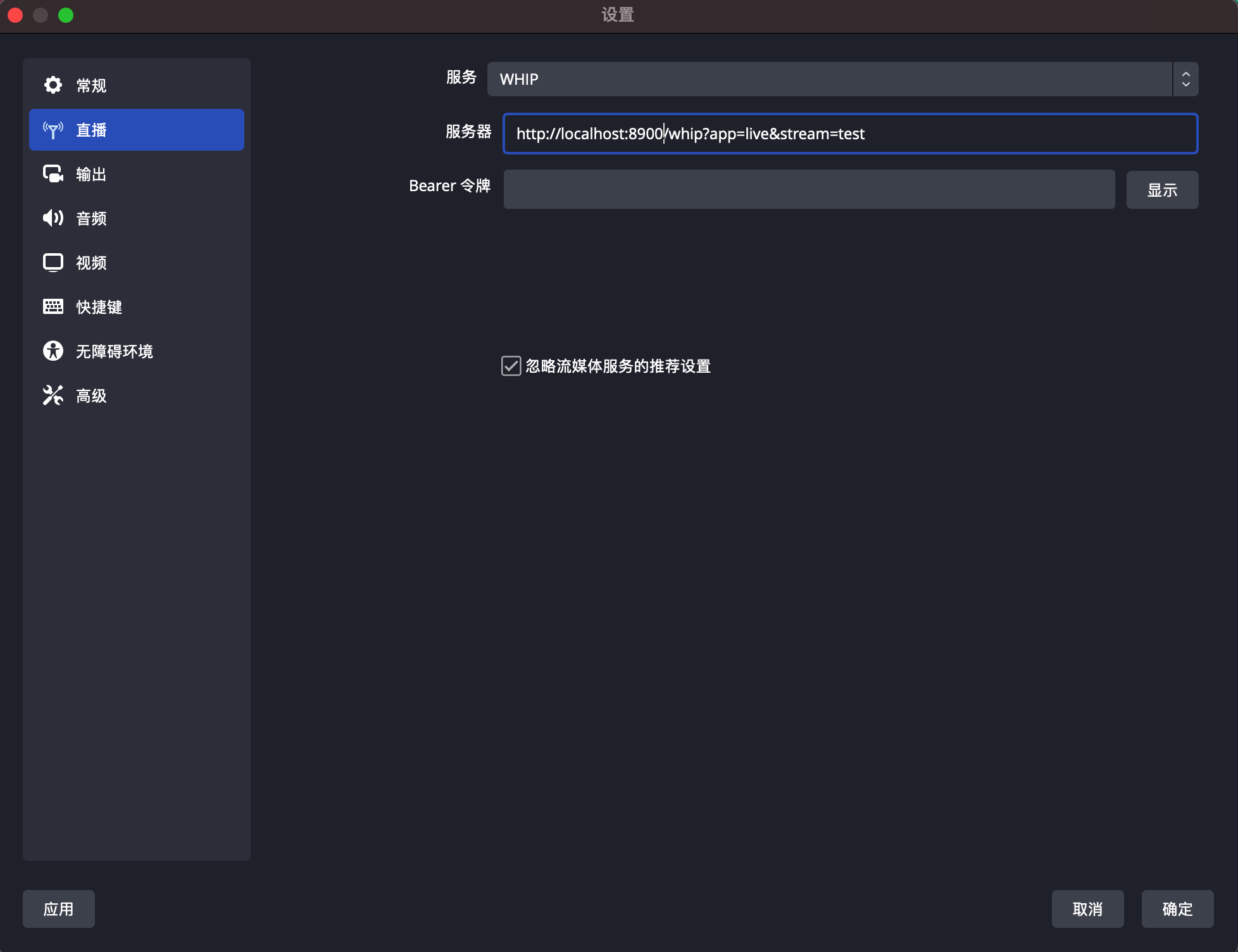 240bc9e68ddSHarlanC 2410a0cb771SHarlanC##### Play 242bc9e68ddSHarlanC 243b36cf5daSHarlanUse ffplay to play the rtmp/rtsp/httpflv/hls live stream: 244bc9e68ddSHarlanC 245bc9e68ddSHarlanC ffplay -i rtmp://localhost:1935/live/test 246b36cf5daSHarlan ffplay -i rtsp://127.0.0.1:5544/live/test 247b36cf5daSHarlan ffplay -rtsp_transport tcp -i rtsp://127.0.0.1:5544/live/test 2480a0cb771SHarlanC ffplay -i http://localhost:8081/live/test.flv 2490a0cb771SHarlanC ffplay -i http://localhost:8080/live/test/test.m3u8 25095184f1aSHarlanC 251*80f20d70SHarlanC- How to play WebRTC stream*(Whep) 252*80f20d70SHarlanC 253*80f20d70SHarlanC 1. Copy the files under xiu/protocol/webrtc/src/clients/ folder to the same level directory of the binary file xiu. 254*80f20d70SHarlanC 2. Open the address http://localhost:8900 in the browser. 255*80f20d70SHarlanC 3. Enter the app name and stream name corresponding to the OBS whip publish address. 256*80f20d70SHarlanC 4. Click Start WHEP(After OBS publish) to play the RTC stream. 257*80f20d70SHarlanC 258*80f20d70SHarlanC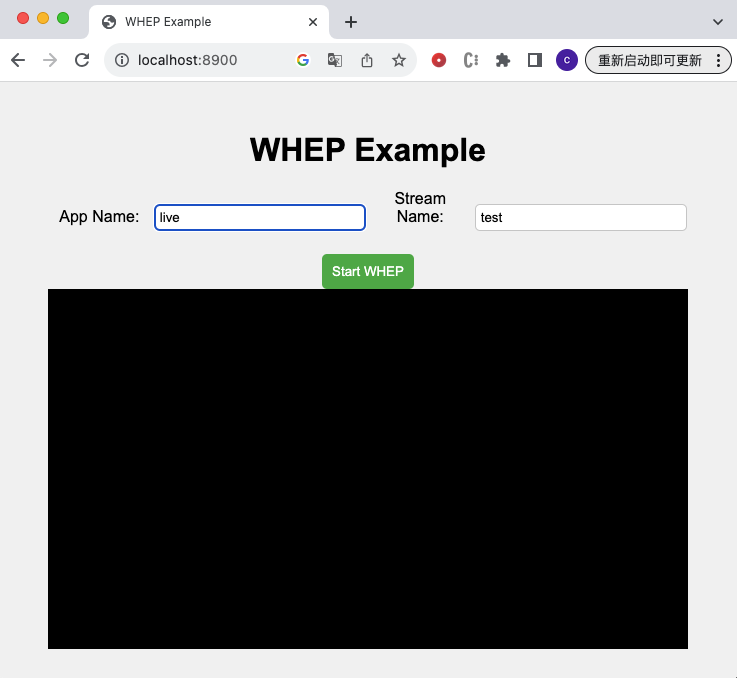 259*80f20d70SHarlanC 260d20ba44cSwawacry##### Relay - Static push 2619cf3582cSHarlanC 262d8f2e6f0SHarlanCThe configuration files are as follows: 2639cf3582cSHarlanC 264f5fdb5dcSHarlanCThe configuration file of Service 1 named config.toml: 2659cf3582cSHarlanC 2669cf3582cSHarlanC [rtmp] 2679cf3582cSHarlanC enabled = true 2689cf3582cSHarlanC port = 1935 2699cf3582cSHarlanC [[rtmp.push]] 2709cf3582cSHarlanC enabled = true 2719cf3582cSHarlanC address = "localhost" 2729cf3582cSHarlanC port = 1936 2739cf3582cSHarlanC 274f5fdb5dcSHarlanCThe configuration file of Service 2 named config_push.toml: 2759cf3582cSHarlanC 2769cf3582cSHarlanC [rtmp] 2779cf3582cSHarlanC enabled = true 2789cf3582cSHarlanC port = 1936 2799cf3582cSHarlanC 2809cf3582cSHarlanCRun the 2 services: 2819cf3582cSHarlanC 2820a0cb771SHarlanC ./xiu config.toml 2830a0cb771SHarlanC ./xiu config_push.toml 2849cf3582cSHarlanC 2859cf3582cSHarlanC 286d20ba44cSwawacryUse the above methods to push rtmp live stream to service 1, then the stream can be pushed to service 2 automatically, you can play the same live stream from both the two services: 2879cf3582cSHarlanC 2889cf3582cSHarlanC ffplay -i rtmp://localhost:1935/live/test 2899cf3582cSHarlanC ffplay -i rtmp://localhost:1936/live/test 2909cf3582cSHarlanC 2919cf3582cSHarlanC 2929cf3582cSHarlanC 293d20ba44cSwawacry##### Relay - Static pull 2949cf3582cSHarlanC 295d8f2e6f0SHarlanCThe configuration file are as follows: 2969cf3582cSHarlanC 297f5fdb5dcSHarlanCThe configuration file of Service 1 named config.toml: 2989cf3582cSHarlanC 2999cf3582cSHarlanC [rtmp] 3009cf3582cSHarlanC enabled = true 3019cf3582cSHarlanC port = 1935 3029cf3582cSHarlanC 3039cf3582cSHarlanC 304f5fdb5dcSHarlanCThe configuration file of Service 2 named config_pull.toml: 3059cf3582cSHarlanC 3069cf3582cSHarlanC [rtmp] 3079cf3582cSHarlanC enabled = true 3089cf3582cSHarlanC port = 1936 3099cf3582cSHarlanC [rtmp.pull] 3109cf3582cSHarlanC enabled = false 3119cf3582cSHarlanC address = "localhost" 3129cf3582cSHarlanC port = 1935 3139cf3582cSHarlanC 3149cf3582cSHarlanCRun the 2 services: 3159cf3582cSHarlanC 3160a0cb771SHarlanC ./xiu config.toml 3170a0cb771SHarlanC ./xiu config_pull.toml 3189cf3582cSHarlanC 319d20ba44cSwawacryUse the above methods to push live stream to service 1, when you play the stream from serivce 2, it will pull the stream from service 1: 3209cf3582cSHarlanC 3219cf3582cSHarlanC ffplay -i rtmp://localhost:1935/live/test 3229cf3582cSHarlanC ffplay -i rtmp://localhost:1936/live/test 3237062c524SHarlanC## Star History 3247062c524SHarlanC 325*80f20d70SHarlanC[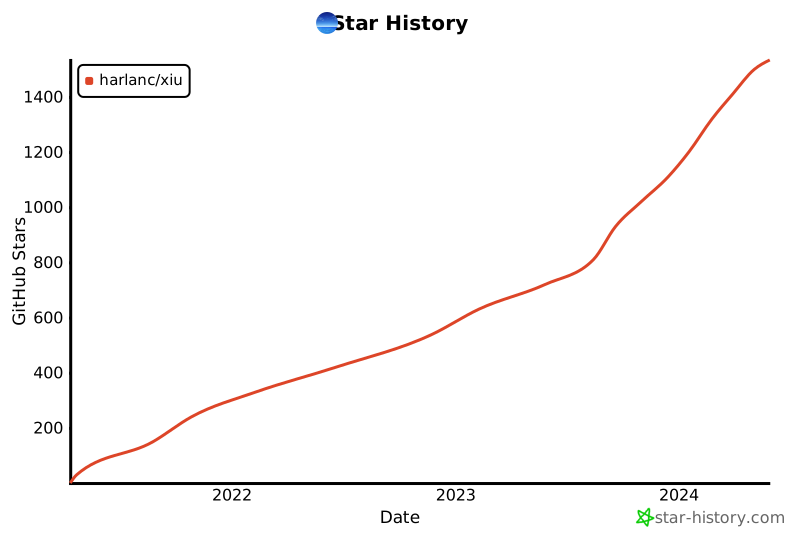](https://star-history.com/#harlanc/xiu) 326*80f20d70SHarlanC 3270a0cb771SHarlanC 3280a0cb771SHarlanC## Thanks 3290a0cb771SHarlanC 3300a0cb771SHarlanC - [media_server](https://github.com/ireader/media-server.git) 3310a0cb771SHarlanC 3320a0cb771SHarlanC## Others 3330a0cb771SHarlanC 33437a05031SHarlanCOpen issues if you have any problems. Star and pull requests are welcomed. Your stars can make this project go faster and further. 3350a0cb771SHarlanC 336

)
)
)
)
)
)
)
)
)
)
)
)
)
)
)
)
)
)
)
)
)
)
)
)
)

)